Gmail is fantastic for personal email. It's just a remarkably fragile foundation for a business identity.
When a company operates out of an @gmail.com or @outlook.com address, it causes two distinct types of damage: it lets attackers stand in the exact same line as you, and it forces spam filters to judge you by the neighborhood you chose to live in.
A surprising number of small businesses still operate this way: answering the phone like an established company, but sending emails like an individual consumer. In our regional digital trust audits across Greater Fredericksburg and Prince William County (evaluating 1,814 local business identities), 14.9% of commercial organizations—nearly one in every seven—still conduct business directly from free consumer webmail (see the regional audit benchmarks).
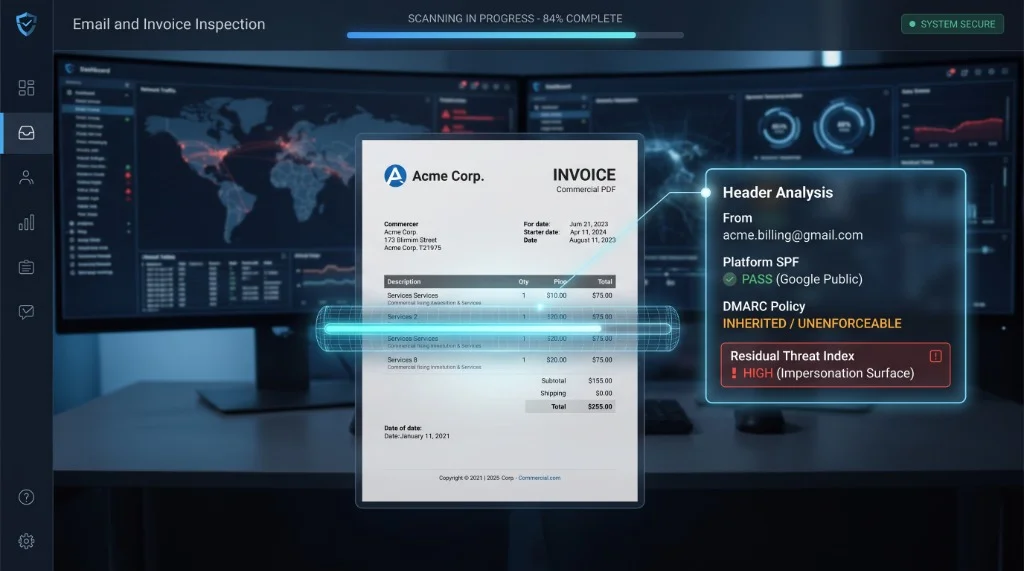
The PDF invoice looks sharp and professional, but the "From" line reads [email protected]. And when that happens, your customers, the spam filters, and malicious actors all immediately spot the mismatch.
This isn't an argument that Gmail or Outlook are insecure services—they run some of the best consumer security infrastructure in the world. But consumer email is built for personal communication, not organizational trust. That distinction becomes obvious the first time you send a quote, a shipping notice, or a payment request.
Two Disadvantages, Not Just One
Most advice on this topic stops at aesthetics: "it looks unprofessional." But appearance is the least of your problems. The real risks are structural.
1. Impersonation is dirt cheap on a shared domain
When you own your domain (yourcompany.com), an attacker trying to pose as you has to spoof or hijack your domain. By publishing standard authentication rules—SPF, DKIM, and DMARC—you give receiving mail servers explicit instructions: if the envelope sender doesn't cryptographically check out, quarantine or reject it immediately.
Are your emails actually reaching the inbox?
Corporate spam filters block thousands of legitimate emails every day due to invisible DNS misconfigurations. Find out if your domain is secretly penalized.
Free, instant report. No installation required.
On gmail.com, you don't get to set those rules. Google already did. To the rest of the internet, you are simply one mailbox among billions.
That structural flaw enables the single most common attack against small businesses: Display Name Deception (also known as Display Name Spoofing).
Non-technical executives frequently confuse forging an envelope sender with changing a display name. They assume that if an incoming email passes authentication, the human identity behind it must be legitimate. But an attacker doesn't need to forge the technical envelope. They simply register a free account in thirty seconds—like [email protected]—and set the friendly display name to "John Smith" or "Acme Accounting".
Here is the trap: Gmail’s legitimate DKIM signature acts as a Trojan horse for the forged display name.
Because the email originates from genuine Google infrastructure, SPF passes and Google signs the message with a 100% authentic, valid DKIM cryptographic key. The receiving security gateway inspects the technical headers, sees a flawless cryptographic handshake, and marks the message clean. The security protocol did not fail; rather, legitimate platform cryptography was used to deliver a human lie straight past the gateway into a busy employee’s inbox.
That is why free webmail accounts remain the default disguise for invoice lures, PO fraud, and "quick question from the owner" scams.
When we pulled aggregate telemetry across a sample of our protected client environments, the real-world data confirmed this exact pattern:
- Out of 908 residual threat incidents that slipped past native platform filters and had to be remediated post-delivery, 93.2% were phishing attacks.
- 252 of those incidents (27.8%) originated from free consumer mailboxes.
gmail.comwas the #1 attacking domain across every client tenant in the sample (115 incidents, accounting for 12.7% of all threats), with Outlook and Hotmail taking second and third place across the board.
Think about that: more than one in four leftover threats arrived from the exact same class of address that many small businesses still print on their invoices.
The security rule is simple: If the invoice doesn't come from a domain the vendor controls, it's not a valid invoice. But you can't teach your team or your customers that rule while your own sales desk is sending from Gmail.
2. Spam filters know exactly what consumer mail is supposed to look like
Modern mail filters don't evaluate your good intentions; they evaluate behavioral patterns.
Free webmail is engineered for people writing to people. The moment your emails start carrying transactional business baggage—PDF attachments, wire instructions, PO numbers, "updated banking details," or bulk announcements—you deviate sharply from the traffic patterns those consumer domains were trained to trust.
Worse, you don't own the reputation you're sending on:
- You can't publish your own DMARC policy: You inherit Google's or Microsoft's global rules.
- You can't isolate a bad week: If thousands of spammers or compromised consumer accounts share your pool, you share their reputation dip.
- You can't establish enterprise trust: You can't configure BIMI (brand logos in inboxes), set up clean vendor-allowlist rules, or sign messages with a DKIM key a corporate buyer can uniquely tie back to your business.
Since early 2024, Google tightened its own policies so that unaligned mail claiming to be @gmail.com gets quarantined. Real Gmail accounts sending business payloads will still deliver, but downstream enterprise systems increasingly treat them with suspicion.
Some messages will get through, but plenty will land in spam folders, pick up warning banners, or get silently dropped by corporate accounts-payable systems that have hard rules against paying vendors from consumer accounts.
When you send business mail from a personal address, you're driving in someone else's lane—and the marshals are watching that lane for an entirely different sport.
What the Numbers Are — and Are Not
To be clear about the methodology: this is aggregate telemetry drawn from a sample of our active client mailboxes. These 908 incidents were not standard spam messages blocked at the gateway. These were malicious messages that native platform defenses (like Microsoft 365 or Google Workspace built-in filters) initially evaluated, accepted, and delivered into real user mailboxes.
A secondary mailbox layer clustered them, analyzed the URLs and behavioral indicators, and pulled them back out of 1,650 mailboxes across those client environments (averaging roughly 1.8 inboxes impacted per campaign). 98.1% of these clawbacks were resolved automatically, without requiring human intervention in the queue.
While we don't track a granular message trace of every single benign email accepted during that window, a standard SMB baseline (25–40 inbound messages per mailbox per day across the 24 sampled client mailboxes over roughly eight months) suggests an aggregate volume on the order of 144,000 to 230,000 messages.
Against those 908 residual incidents, the leftover defect rate in our client sample sits around 0.4% to 0.6%—roughly one out of every 160 to 250 accepted messages.
Treat that as an aggregate order of magnitude rather than false precision. The underlying point remains clear: native platform filtering is necessary, but not sufficient. While the bypass rate looks small as a share of total mail volume, it represents almost all of your actual breach risk. Nearly all of it is phishing—and more than a quarter of that risk walks right through the front door wearing a free webmail disguise.
The Custom Domain Trap (and Why Forwarding Doesn't Work)
A lot of business owners try to solve this by purchasing yourcompany.com and simply forwarding incoming messages to a personal Gmail inbox.
Unfortunately, that workaround creates a fresh set of issues:
- Forwarding regularly breaks SPF alignment, causing legitimate client messages to bounce or get flagged.
- Your domain inherits the reputation of whatever spam gets forwarded through it.
- You still end up replying from a consumer inbox, leaving you right back where you started with identity and deliverability issues.
It's the digital equivalent of hanging a professional company sign on your front door while leaving your physical mail slot in a shared apartment building.
The actual solution is straightforward:
- Own a domain you control.
- Host your email directly on that domain (e.g., Google Workspace or Microsoft 365), rather than forwarding it to personal webmail.
- Configure and tighten your SPF, DKIM, and DMARC policies.
- Maintain an active defense layer that stays awake after the native platform marks an email as "delivered."
None of this requires an enterprise SOC playbook. It's simply the baseline difference between operating as an established firm on the internet and borrowing a consumer account until something expensive happens.
Where to Go From Here
If you're still sending business emails from @gmail.com because it was the easiest option in year one, that was a reasonable shortcut. But it is a bad steady state.
Here is how to address it:
- Check the domain you actually send from. If you don't own it, moving to your own hosted domain is step one.
- Audit your email authentication. If you already own your domain but have never configured DMARC, tighten your records now.
- Review your financial and billing workflows. If the only thing standing between a plausible lookalike Gmail invoice and your accounting team is hope, put a strict verification process in place today.
Want to see where your business domain stands before an impersonator takes advantage of an unsealed sender identity? Run your domain through our instant verification engine:
Related Resources
- Professional Email Services — Domain-based email with verified identity
- Business Email Startup — $250 — Microsoft 365 setup with SPF, DKIM, DMARC
- Free Email Security Check — SPF, DKIM, DMARC scored in 30 seconds
- Managed IT in Stafford, VA — Monitoring, patching, MDR, and support
- Case Studies — See how we've helped businesses like yours
- All Services — IT support, network design, and security

