

On this page
- You deployed Microsoft 365 securely—now what?
- Tier 1: Low-risk baseline (10 foundational controls)
- Tier 2: Moderate-risk target standard (+7 controls, 17 total)
- Microsoft 365 licensing reality check (what unlocks what)
- CMMC Level 1: Federal progression (+17 controls, 34 total)
- HIPAA overlay: Healthcare & business associates (+10 controls)
- How controls are verified: Telemetry, attestation & exceptions
- What clients actually see: Live sample security report
- Putting the "now what" roadmap into practice
- Frequently asked questions
Beyond Basic Setup: Microsoft 365 Security Controls & Maturity Tiers
Already on Microsoft 365? Here is the 'now what' control roadmap: Tier 1 baseline, Tier 2 target standard, CMMC Level 1 progression, and HIPAA controls.
Still deploying your tenant or fixing DNS authentication first? Start with The Guide to Secure Microsoft 365 Business Setup. Once day-one setup is done, this guide answers the harder question: now what?
You deployed Microsoft 365 securely—now what?
Turning on MFA and publishing SPF, DKIM, and DMARC stops the easiest opportunistic attacks—but it is only the starting line. Real small-business security is not a one-time setup wizard; it is a measurable set of enforceable controls mapped to risk and verified continuously across your tenant, DNS, endpoints, backups, and office operations.
At Enuclea, we classify small businesses by operational risk profile—and most small businesses formally sit in Tier 1 (Low Risk). However, stopping at bare-minimum Tier 1 leaves predictable gaps around hijacked browser sessions, post-delivery phishing, unmanaged personal devices, and accidental data exposure.
Our methodology works deliberately toward maturity: we treat every small business as a Tier 2 target standard and build progressively toward CMMC Level 1 compliance—layering HIPAA safeguards wherever a healthcare practice or Business Associate handles electronic Protected Health Information (ePHI).
p=reject, dedicated admins, EDR on every endpoint, audit logging, and immutable cloud backups.
Tier 1: Low-risk baseline (10 foundational controls)
Even a five-person local business with no federal contracts or medical records needs these 10 foundational controls locked down first (hybrid offices with on-premises servers add an 11th baseline control verifying server/workstation BCDR backups). Together, they neutralize the highest-probability small-business compromise paths: credential stuffing, MFA bypass, domain spoofing, malicious attachments, unmonitored workstations, silent inbox forwarding rules, and unrecoverable cloud deletion.
| Rule | Control | Severity | What It Enforces & How It Is Verified |
|---|---|---|---|
M365-AUTH-001 |
Legacy authentication disabled | Critical | Blocks POP3, IMAP, SMTP Basic Auth, and legacy ActiveSync protocols that bypass MFA entirely. Evidence: Microsoft 365 / Entra ID. |
M365-MFA-001 |
MFA enforced for all users | Critical | Requires modern multi-factor authentication on every interactive sign-in across every user account without quiet carve-outs. Evidence: Microsoft 365 / Entra ID. |
M365-MAIL-001 |
Email authentication (SPF, DKIM, DMARC at p=reject) |
Critical | Single clean SPF record under 10 lookups, active custom 2048-bit DKIM signing, and DMARC enforced at p=reject to block exact-domain spoofing. Evidence: Authoritative DNS (verify free). |
M365-MALW-001 |
Malicious attachments blocked | Critical | Hardens Exchange Online anti-malware policies and common attachment filters to strip executable, script, and risky file types before inbox delivery. Evidence: Microsoft 365. |
END-EDR-001 |
Endpoint protection (EDR) on every computer | Critical | Active, human-monitored 24/7 EDR/MDR (such as ThreatDown 24/7 MDR) deployed on 100% of company workstations and laptops—not passive consumer antivirus. Evidence: ThreatDown EDR. |
BAK-CLOUD-001 |
Cloud data backed up (M365 or Google Workspace) | Critical | Independent, write-once cloud-to-cloud backups (such as Axcient Cloud-to-Cloud) covering Exchange, SharePoint, OneDrive, and Teams. Native Recycle Bins are not backups. Evidence: Axcient. |
M365-ADM-001 |
Dedicated admin accounts & Global Admin count | High | Separates privileged Global Administrator accounts from daily email/web accounts and restricts total Global Admins to a minimal, audited set (typically 2–4 cloud-only identities). Evidence: Microsoft 365. |
M365-AUD-001 |
Mailbox auditing & Unified Audit Log ingestion | High | Confirms Purview Unified Audit Logging and mailbox audit actions are active and ingested so forensics can verify exactly what happened if an account is ever targeted. Evidence: Microsoft 365. |
M365-SHAR-001 |
SharePoint & OneDrive external sharing limits | High | Disables unauthenticated "Anyone with the link" anonymous sharing by default and puts guardrails on guest links and link expiration. Evidence: Microsoft 365. |
M365-FWD-001 |
Outbound auto-forwarding disabled | High | Blocks automatic forwarding of corporate mail to external domains—cutting off one of the primary persistence and invoice-interception methods used in Business Email Compromise. Evidence: Microsoft 365. |
If a business consciously chooses not to purchase an independent control—such as third-party cloud-to-cloud backups (BAK-CLOUD-001)—we never hide it or mark it green. We record it as a formal, time-bound client risk exception with an explicit expiration and review date so leadership always knows what is protected and what is accepted risk.
Tier 2: Moderate-risk target standard (+7 controls, 17 total)
Once Tier 1 is solid, attackers pivot to what basic setup does not cover: adversary-in-the-middle (AiTM) session cookie theft, clean-looking phishing emails that sail past native filters, employees downloading company files onto unmanaged home laptops, and sensitive financial or client data leaving via email. That is why Enuclea treats Tier 2 as the operational target for every maturing small business.
Tier 2 retains all 10 Tier 1 controls and layers 7 incremental defenses:
| Rule | Incremental Control | Severity | What It Closes & License / Tooling Notes |
|---|---|---|---|
M365-DLP-001 |
Data Loss Prevention (DLP) for personal, financial & health data | High | Detects and blocks accidental or unauthorized external transmission of SSNs, payment/banking details, tax IDs, and health data across Exchange, SharePoint, OneDrive, and Teams. |
EMAIL-ADV-001 |
Advanced email threat protection (phishing, impersonation & IR) | High | Adds AI-driven executive/vendor impersonation detection and autonomous post-delivery threat clawback (such as IronScales) to catch BEC messages native Microsoft filters miss. |
M365-INTUNE-COMP-001 |
Device compliance gating for cloud apps | High | Requires enrolled, encrypted, policy-compliant devices via Conditional Access before permitting cloud app sign-in. Minimum license: Microsoft Intune Plan 1 + Entra ID P1 (both included in M365 Business Premium). |
M365-DEF-O365-001 |
Safe Links & Safe Attachments (or equivalent) | High | Time-of-click URL rewriting and sandboxed attachment detonation to neutralize delayed weaponized payloads. Minimum license: Microsoft Defender for Office 365 Plan 1 (included in M365 Business Premium and E5, or add-on / equivalent layered protection). |
M365-CA-RISK-001 |
Risk-based Conditional Access (user & sign-in risk) | High | Automatically forces step-up authentication or blocks sign-ins flagged for leaked credentials, anonymous proxies, or anomalous session behavior. Minimum license: Microsoft Entra ID P2 (add-on or M365 E5—not included in Business Premium). |
M365-SESS-001 |
Session lifetime & Continuous Access Evaluation (CAE) | Medium | Caps persistent sign-in lifetimes on sensitive/admin sessions and enables Continuous Access Evaluation so disabled users or password resets revoke active tokens near-instantly. |
M365-SSPR-001 |
Self-service password reset & smart lockout | Medium | Tightens Entra Smart Lockout against password-spray attacks while enabling verified self-service recovery—reducing social-engineering risk at the helpdesk. |
Microsoft 365 licensing reality check (what unlocks what)
One of the biggest frustrations in small-business Microsoft 365 security is discovering mid-project that a control is locked behind a higher SKU. A transparent control framework distinguishes between a failed control and one that is not applicable until the right license or third-party layer is in place:
| License / Stack Layer | Controls Unlocked | Key Caveats |
|---|---|---|
| M365 Business Basic / Standard | Core Tier 1 identity & Exchange controls via Security Defaults (AUTH, MFA, ADM, AUD, SHAR, FWD, MALW) |
No granular Conditional Access, no Intune compliance gating, no Defender for Office 365 Plan 1, no Purview DLP. |
| M365 Business Premium | Adds Entra ID P1, Intune Plan 1, Defender for Office 365 Plan 1, and Purview DLP—unlocking M365-INTUNE-COMP-001, M365-DEF-O365-001, M365-DLP-001, and M365-SESS-001 |
Best value SMB security suite (included in our $105/seat* Full Stack), but still excludes Entra ID P2 risk-based Conditional Access. |
| Entra ID P2 Add-On / M365 E5 | Unlocks M365-CA-RISK-001 (automated user-risk and sign-in-risk Conditional Access via Entra ID Protection) |
Required whenever automated identity-risk policies are mandated; add-on licensing keeps costs targeted if E5 is unnecessary. |
| Dedicated Security Layers | END-EDR-001 (ThreatDown 24/7 MDR), EMAIL-ADV-001 (IronScales AI clawback), BAK-CLOUD-001 (Axcient C2C), M365-MAIL-001 (Hosted DMARC) |
Independent from Microsoft's blast radius—providing 24/7 human SOC response, post-delivery phishing removal, and immutable recovery. |
CMMC Level 1: Federal progression (+17 controls, 34 total)
Even if your company does not hold a DoD subcontract today, working toward CMMC Level 1 (FAR 52.204-21) is the cleanest maturity path available for a growing small business—especially in Northern Virginia, Stafford, and Fredericksburg where contractors, engineering firms, legal practices, and suppliers routinely intersect with government ecosystems.
CMMC Level 1 builds on all 17 Tier 1 + Tier 2 controls and adds 17 foundational safeguarding controls across six operational domains—bridging cloud hygiene into endpoint encryption, disciplined patching, network boundary separation, and physical office accountability:
| Rule | CMMC Level 1 Control | Severity | Domain & Verification Scope |
|---|---|---|---|
CMMC1-AC-3.1.1 |
Authorized access control | Critical | Access Control: Restricts system and cloud access strictly to authorized users, processes, and managed devices. |
CMMC1-AC-3.1.2 |
Transaction & function control | High | Access Control: Enforces least-privilege role boundaries so staff can only perform job-necessary functions. |
CMMC1-AC-3.1.20 |
External connections boundary | High | Access Control: Controls and verifies external tenant collaboration, third-party OAuth apps, and external connections. Evidence: Microsoft 365. |
CMMC1-AC-3.1.22 |
Public information control | Critical | Access Control: Prevents internal or sensitive files from being exposed on publicly accessible systems or open SharePoint links. Evidence: Microsoft 365. |
CMMC1-IA-3.5.1 |
Individual user identification | Critical | Identification & Auth: Every human user must sign in with a unique named identity—zero shared passwords like frontdesk@ or shop@. Evidence: Microsoft 365. |
CMMC1-IA-3.5.2 |
User authentication & MFA | Critical | Identification & Auth: Verifies identities of users, devices, and processes prior to granting access. Evidence: Microsoft 365. |
CMMC1-MP-3.8.3 |
Media sanitization & disk encryption | High | Media Protection: Enforces BitLocker/FileVault full-disk encryption on endpoints and documented drive wipe/destruction before disposal. Evidence: ThreatDown / Endpoint telemetry. |
CMMC1-PE-3.10.1 |
Physical protection & inactivity screen lock | High | Physical Protection: Restricts physical access to equipment and locks unattended workstation screens automatically. |
CMMC1-PE-3.10.3 |
Visitor escort | Low | Physical Protection: Requires escorting and supervising visitors in areas housing business systems or network closets. Verification: Written attestation. |
CMMC1-PE-3.10.4 |
Physical access audit logging | High | Physical Protection: Maintains audit logs of physical entry to offices, server closets, or sensitive work spaces. Verification: Written attestation. |
CMMC1-PE-3.10.5 |
Physical access devices & hardware MFA | High | Physical Protection: Tracks, issues, and revokes keys, badges, and phishing-resistant hardware MFA tokens cleanly during offboarding. Evidence: Microsoft 365 / Inventory. |
CMMC1-SC-3.13.1 |
Boundary protection & TLS transport | Critical | System & Comms: Monitors and protects communications at network edges (business-grade firewall such as Fortinet) and enforces encrypted TLS transport. |
CMMC1-SC-3.13.5 |
Public access separation | High | System & Comms: Separates public-facing systems and guest Wi-Fi onto isolated VLAN subnetworks away from internal workstations and servers. |
CMMC1-SI-3.14.1 |
Flaw remediation (patching) | High | System Integrity: Identifies and patches OS and third-party application vulnerabilities on a tracked, automated cadence (RMM + EDR telemetry). Evidence: ThreatDown / RMM. |
CMMC1-SI-3.14.2 |
Malicious code protection | Critical | System Integrity: Active malware detection and containment across endpoints and mail gateways. Evidence: ThreatDown. |
CMMC1-SI-3.14.4 |
Malicious code signature updates | High | System Integrity: Automated, continuous definition and detection-engine updates across all managed endpoints. Evidence: ThreatDown. |
CMMC1-SI-3.14.5 |
System scans & periodic audits | High | System Integrity: Scheduled endpoint scans plus real-time scanning of downloaded files and external media. Evidence: ThreatDown. |
By far the most common critical failure we encounter when benchmarking commercial tenants against CMMC Level 1 (CMMC1-IA-3.5.1) or HIPAA (HIPAA-164.312-A1) is shared interactive accounts like reception@ or accounting@. The fix costs zero extra licenses for role addresses: assign every employee a named user account, convert role addresses into Exchange Shared Mailboxes, and delegate access cleanly.
HIPAA overlay: Healthcare & business associates (+10 controls)
For medical clinics, dental practices, behavioral health groups, and HIPAA Business Associates, the same Tier 1 + Tier 2 security engineering foundation maps cleanly onto the HIPAA Security Rule (45 CFR Part 164). Layering these 10 healthcare-specific safeguards brings the profile to 27 tracked controls covering ePHI access, integrity, encryption, auditing, and workforce lifecycle:
| Rule | HIPAA Safeguard | Severity | 45 CFR Part 164 Focus & Practical Implementation |
|---|---|---|---|
HIPAA-164.312-A1 |
Unique user identification | Critical | Assigns a unique named identity to every clinician, biller, and staff member so all ePHI access is individually attributable. Evidence: Microsoft 365. |
HIPAA-164.312-A2-I |
Emergency access procedure (break-glass) | High | Maintains documented, tested break-glass emergency admin accounts stored securely (excluded from normal Conditional Access lockouts) so clinical access survives an IdP disruption. Evidence: Microsoft 365. |
HIPAA-164.312-A2-II |
Automatic logoff & inactivity lock | High | Automatically locks unattended exam-room, nursing-station, and front-desk screens after a defined idle window to prevent walk-up ePHI exposure. |
HIPAA-164.312-A2-III |
Encryption at rest (ePHI) | Critical | Enforces and continuously verifies full-disk encryption (BitLocker / FileVault) across every laptop and workstation handling ePHI. Evidence: ThreatDown / Endpoint telemetry. |
HIPAA-164.312-B |
Audit controls & forensic logging | High | Captures and retains authentication, mailbox, SharePoint, and endpoint audit trails to examine activity in systems storing ePHI. Evidence: Microsoft 365. |
HIPAA-164.312-C1 |
ePHI integrity & anti-tampering | High | Protects ePHI from improper alteration or destruction using version history, retention controls, and immutable backups. |
HIPAA-164.312-D |
Mandatory MFA (person or entity authentication) | Critical | Cryptographically verifies that every person accessing ePHI systems is who they claim to be via enforced MFA. Evidence: Microsoft 365. |
HIPAA-164.312-E1 |
Transmission security & anti-exfiltration | Critical | Protects ePHI in transit with enforced TLS, Purview/OME message encryption for external patient or referral mail, and DLP exfiltration rules. |
HIPAA-164.308-A3 |
Workforce termination session revocation | High | Repeatable offboarding checklist that disables sign-in, revokes all active Entra refresh tokens, wipes company mobile profiles, and archives data immediately upon departure. |
HIPAA-164.308-A5 |
Malware protection & attachment detonation | High | Continuous protection against malicious software across endpoints and email attachments (Microsoft 365 + ThreatDown EDR + IronScales). Evidence: Microsoft 365 & ThreatDown. |
How controls are verified: Telemetry, attestation & exceptions
A checkbox spreadsheet filled out once a year goes stale the week after it is signed. A mature small-business security program evaluates every rule continuously using three honest verification modes:
- Automated technical telemetryContinuous checks pulled directly from Microsoft 365 / Entra ID, authoritative public DNS, endpoint EDR (ThreatDown), and cloud backup platforms (Axcient)—surfacing drift immediately when an admin adds an exception, disables MFA, or drops a device off encryption.
- Written operational & physical attestationControls that live outside APIs—visitor escort procedures (
CMMC1-PE-3.10.3), physical access logs (CMMC1-PE-3.10.4), break-glass drills, and termination workflows—are backed by documented procedures and dated sign-off. - Honest license scope & time-bound risk exceptionsControls requiring unpurchased Microsoft add-ons (like Entra ID P2 for
M365-CA-RISK-001) are tracked explicitly as not applicable to current SKU, while any business-declined control carries a documented owner, reason, and annual renewal date—zero silent blind spots.
What clients actually see: Live sample security report
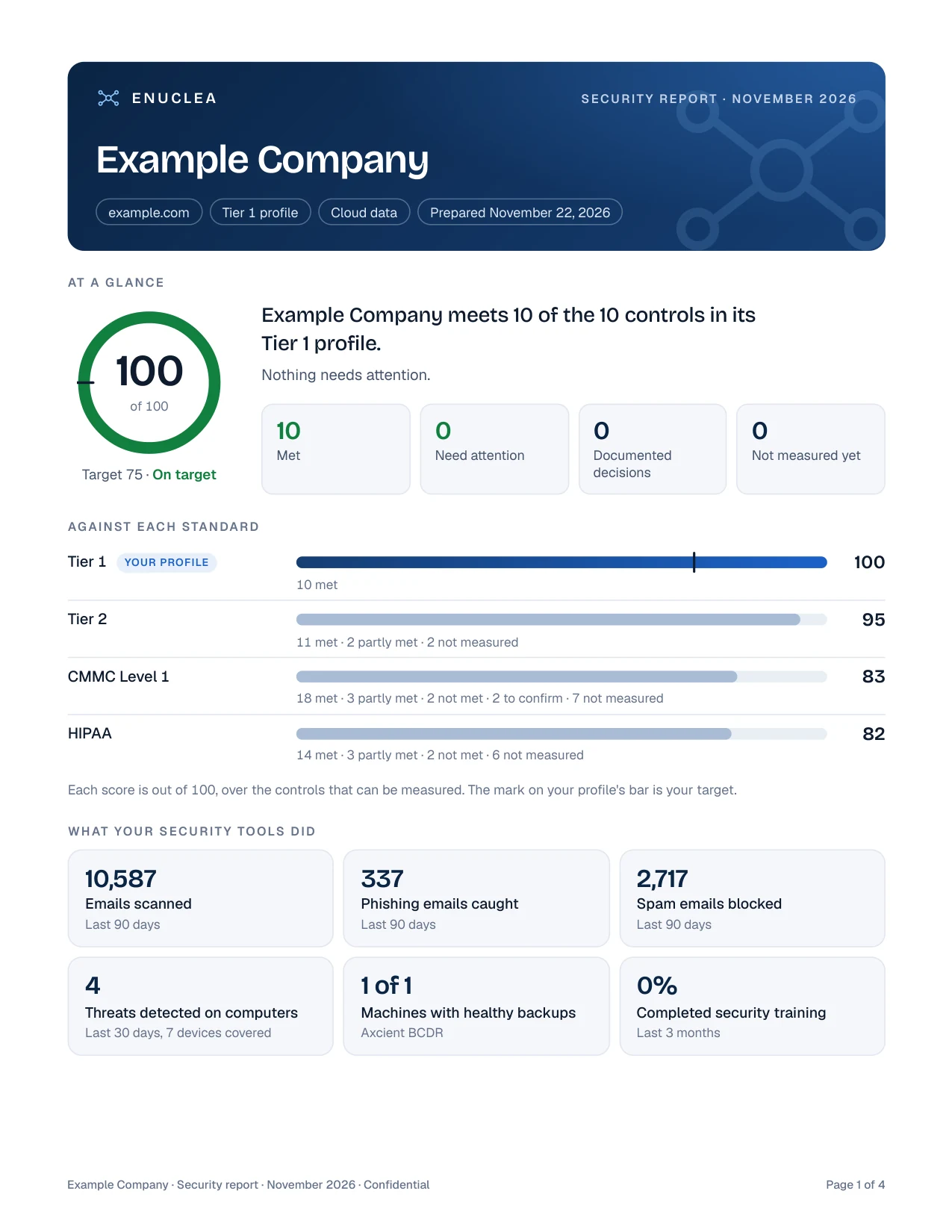
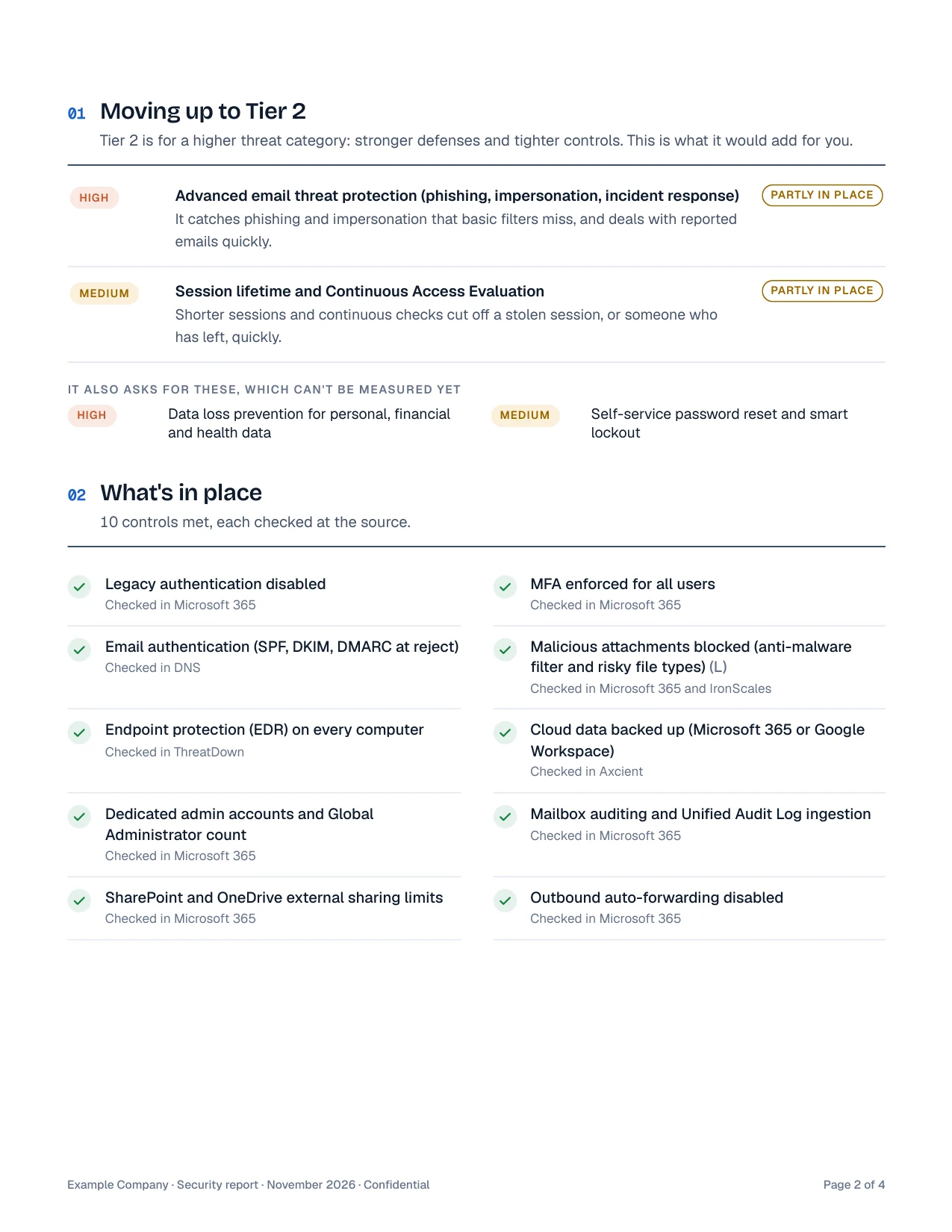
No black boxes, no vague green checkmarks, and no quarterly slide decks built by hand. Nexus, Enuclea's management console, refreshes your security posture automatically twice per day—and managed clients can sign in with a passkey or access code at secure.enuclea.com ↗ to pull a fresh, plain-English PDF on their own whenever an underwriter, board member, or vendor asks. Every report shows exactly how you stack up against Tier 1, Tier 2, CMMC Level 1, and HIPAA alongside live telemetry from Microsoft 365, DNS, IronScales, ThreatDown, and Axcient.
Putting the "now what" roadmap into practice
You do not have to flip 34 controls overnight and break your team's Monday morning workflow. Here is the clean, low-friction sequence we follow under our Quiet IT methodology:
- Phase 1 — Lock all 10 Tier 1 controls cleanlyEliminate legacy auth, enforce MFA everywhere, separate Global Admin accounts, verify DMARC at
p=reject, ensure ThreatDown 24/7 MDR is on every workstation, and deploy Axcient cloud-to-cloud backups. - Phase 2 — Engineer to Tier 2 as your everyday standardStandardize on Microsoft 365 Business Premium where appropriate, enroll devices in Intune compliance gating, layer IronScales AI phishing clawback, configure Purview DLP, tune session lifetimes with CAE, and harden SSPR/Smart Lockout.
- Phase 3 — Close the CMMC Level 1 operational gapRetire shared interactive logins in favor of delegated shared mailboxes, verify 100% BitLocker/FileVault disk encryption, track automated RMM patching, isolate guest Wi-Fi on its own Fortinet VLAN, and standardize hardware MFA / offboarding.
- Phase 4 — Formalize attestations & industry overlaysDocument physical access logs, visitor escorts, and—for healthcare practices—the 10 HIPAA Security Rule technical and termination controls, then monitor continuously.
Frequently asked questions
If my small business is classified as Tier 1 (Low Risk), why aim for Tier 2 and CMMC Level 1?
Does Microsoft 365 Business Premium cover every Tier 2 control?
M365-INTUNE-COMP-001), Defender for Office 365 Plan 1 (M365-DEF-O365-001), and Purview DLP (M365-DLP-001). The notable exception is risk-based Conditional Access (M365-CA-RISK-001), which requires Microsoft Entra ID P2 (an add-on or Microsoft 365 E5).Are shared mailboxes allowed under CMMC Level 1 and HIPAA?
billing@ or info@) delegated to individual licensed users are fully compliant because every read and send event logs under the named employee's identity. What fails CMMC1-IA-3.5.1 and HIPAA-164.312-A1 is a shared login where multiple staff share one username and password.Can we build toward CMMC Level 1 or HIPAA without disrupting daily operations?
p=reject, testing Conditional Access policies on a pilot group before tenant-wide enforcement, and migrating shared logins to delegated mailboxes without losing a single email.We map your live Microsoft 365 tenant, DNS posture, endpoints, and backup coverage directly against Tier 1, Tier 2, CMMC Level 1, and HIPAA—giving you a concrete control scorecard instead of guesswork. Explore our $99 + $10/seat baseline & $105* Full Stack, 24/7 ThreatDown MDR & Cyber Insurance Readiness, book a 15-minute review ↗, or call (703) 239-4620.